Sony WH-CH720N Sound Connect Best EQ
Why?
I want my headset to sound the best it can
How?
Using AutoEqs “Custom Parametric Eq” to create the equalization.
And using Sonys Sound Connect Manual EQ to set the values.
What is our sample rate?
Sony's website will tell...
Under frequency response for Bluetooth, we see Sony list “44.1k” as its sampling frequency, we will use that value.
Optimizer?
Honestly no clue! but the max frequency must be adjusted to 16000Hz, to match the max filter in the app.
Filters?
We will use the following for this:
- https://github.com/jaakkopasanen/AutoEq/wiki/Custom-Parametric-Eq
- https://sengpielaudio.com/calculator-bandwidth.htm
I created a spreadsheet with all the values lined up, following the math in the wiki, and taking the final bandwidth and putting it into the quality calculator to get the final column. Do note that I used a precision of 5 decimal places, you can readjust the values for a greater precision.
Now that I have the qualities, I dump them into AutoEQ, with the filter type as “peaking” for all, as the app does not allow us to set the filter types. Also note, the min and max gains are 10 each way, without any ability to set decimals, which will be important a bit later.
Results
Now that we stamped those values in, what do we get?
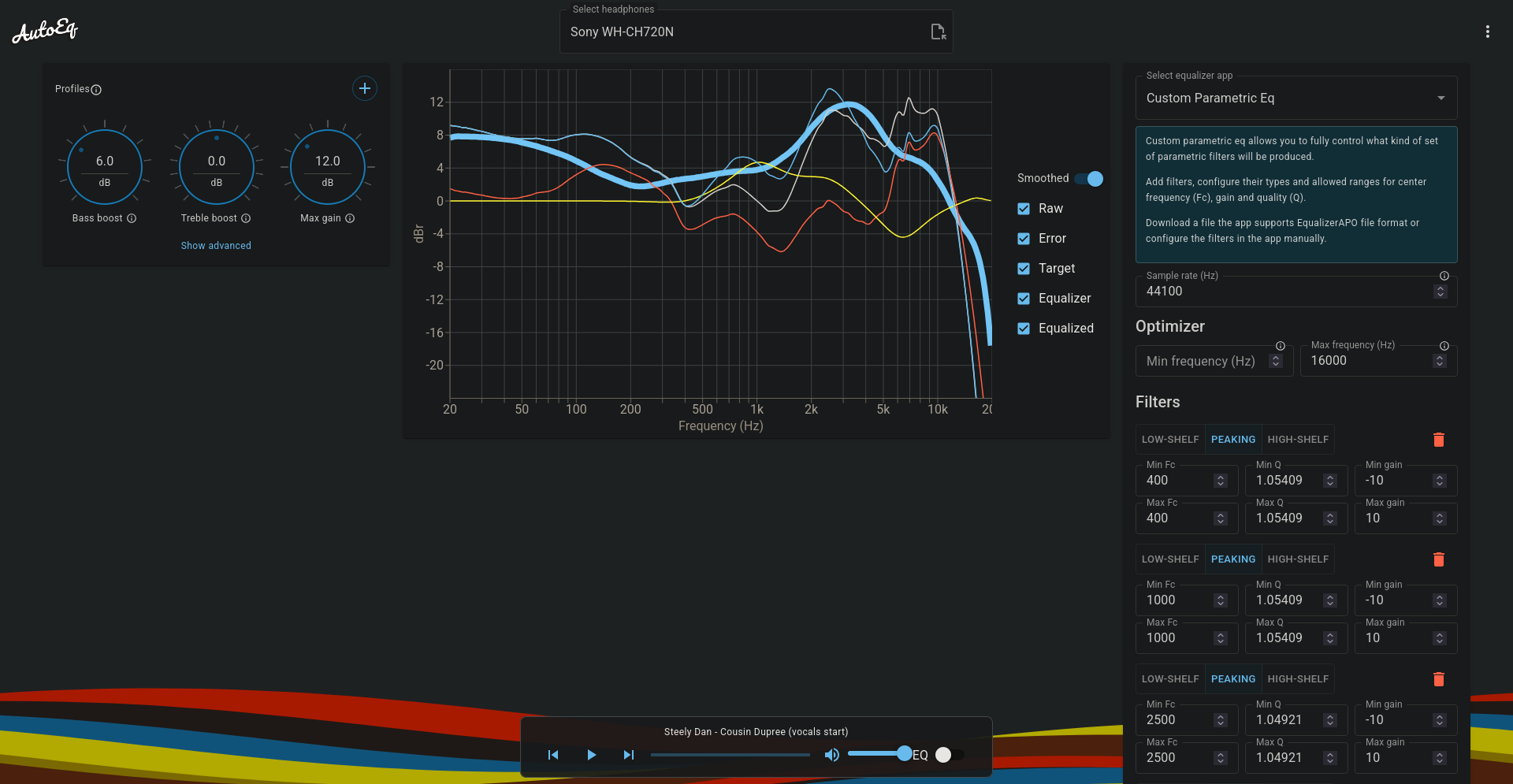
Output:
| Frequency | Q | Gain |
|---|---|---|
| 400 | 1.05 | -0.8 |
| 1000 | 1.05 | 4.5 |
| 2500 | 1.05 | 2.7 |
| 6300 | 1.04 | -4.9 |
| 16000 | 1.04 | 0.6 |
Notice a problem? We cannot set decimal gains in the app.
Lets do some rounding, but we need to consult the chart on AutoEq.
Check the line for “Equalized”, is it higher or lower than the “Target”? That is how you choose the rounding direction, higher means we decrease the value, lower means we increase the value.
| Frequency | Original Gain | High or Low | Rounded Gain |
|---|---|---|---|
| 400 | -0.8 | High | -1 |
| 1000 | 4.5 | High | 4 |
| 2500 | 2.7 | High | 3 |
| 6300 | -4.9 | Low | -4 |
| 16000 | 0.6 | Special Case | 1 |
For the Special Case, 16000Hz, we want to increase the value to compensate for the huge loss for 6300 (-4.9 to -4).
How does it sound?
I listened to “Through Patches of Violet” by “Mili” with a flat equalizer and my manual eq.
This song does not feel strong enough to change... But the voices feel a bit clearer, crisper some might say. The sound stage feels a bit “bigger” if that is the right word for it.
Then I listened to “Sheriruth” from “Team Grimoire” and I must say, wow. It feels different, the bigger stage feeling seems to amplify here now that there has been a slight pivot in the frequencies. The mid range is more pronounced, while the higher sounds of those bronze metal strike things on drums that go “tiss” don't clog up as much of the stage as before.
Footnotes
No Clue
Tell me I am wrong, or make a blog post proving I am wrong lol, please.
I don't know what I am doing.
Clear Bass
Also I do not know what range “Clear Bass” effects, so I cannot compute for it. If someone can provide the Frequency range it changes, I will be able to calculate the rest, or you can also just provide me that, which works too.
I assume it is from below 400, thus given that its high on the chart from AutoEq, lets do a -1, because I do not know how much it changes. -2 also works if you want.
Tags
#Sony #SoundConnect #AutoEq #Equalizer
✨